● Built by a student at ASU

Know what to do today.

Canvas tells you what's due. LMK tells you what to actually do today — one short list, sized to the hours you really have. It learns how long your work takes, so the plan gets more honest every week.

No account required. Set up on a computer first; your phone works after that. Built at ASU; works at any school that uses Canvas or D2L Brightspace.

Get your study plan ready.

LMK Today connects to Canvas or D2L Brightspace and turns your coursework into a personalized daily plan.

To get started, you'll need Google Chrome on your laptop or desktop.

Already set up on a computer? Open LMK ·
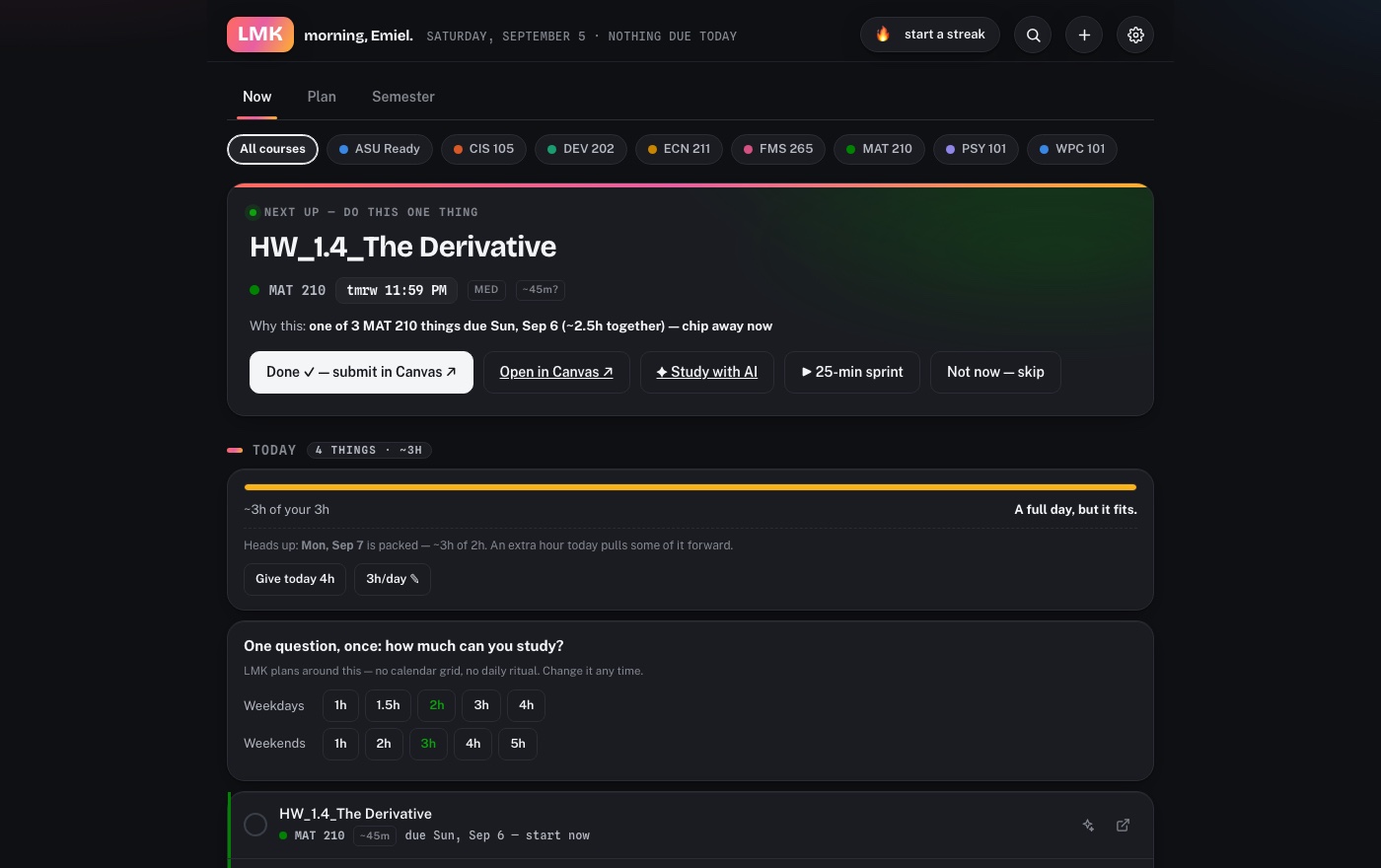
LMK's Today view: one next step and today's plan sized to your hours
Set up

Set up LMK in about two minutes, once.

Start on a computer, in Chrome (Edge, Brave and Arc work too). LMK reads your classes through a browser extension, and a phone can't install one.

On a computer

  1. 1

    Add the LMK Today extension

    Add it from the Chrome Web Store. It's free, and it's the step that makes LMK work: the extension is how it reads your classes. Chrome will say LMK can read and change data on your school's site: that's Chrome's standard wording for any extension that reads a page. LMK reads your assignments and never hands in, posts or deletes your work. LMK opens by itself once it's in.

  2. 2

    Tell LMK your school

    Start typing your school's name and pick it. LMK works with Canvas and D2L Brightspace, whatever your school calls it: D2L, MyCourses, eLearning, iCollege and so on. Not listed? Type the address you see when you're signed in to your classes, like mycourses.yourschool.edu.

  3. 3

    Sign in to your school's site

    LMK opens it as soon as you pick your school. Sign in if it asks, and a few seconds later your classes appear in LMK: your courses, every assignment, what you've handed in and your scores. If your school's site has its own address, Chrome asks you once first: press Allow. That's the end of setup. Open LMK each morning for today's list.

Then, for your phone (optional)

  1. 4

    On the computer: sign in with Google

    In LMK, press Sync across devices at the bottom and sign in with Google. Your plan is saved to a file in your own Google Drive, which is how your phone gets it.

  2. 5

    On your phone: sign in with the same account

    Open lmktoday.app on your phone and sign in with the same Google account. Only do this after steps 1 to 4: until a computer has read your classes, there is nothing for your phone to show.

Why it's different

It learns how long your work actually takes.

Every other planner makes you type an estimate for every task. LMK measures instead, then checks itself against reality.

⏱️

It times your work without asking

Focus sprints, the time Canvas or D2L Brightspace already recorded on your quizzes, and quiet timing while you work on an assignment page. You never fill in a form.

📈

Guesses turn into knowledge

An estimate starts with a question mark and earns a check once LMK has watched you do a few. Your reading pace and your problem-set pace are learned separately.

✦

Know which hour is worth the most

LMK knows what each assignment is worth toward your final grade and how long it takes you. Put those together and everything left ranks by grade per hour, so the night before an exam you know what to touch first.

 CanvasLMK
Shows what's dueYesYes
Tells you what to do todayNoYes
Knows how long it takesNoLearns it
Warns before a heavy weekNoYes
Groups a course's pile-upsNoYes
Knows what's done in classNoYes
Less stress by design

A planner that can tell you to relax.

🌤️

"Nothing needed today"

A clear day is a real answer, and LMK will say it plainly instead of showing you a wall of future work.

🔀

Honest overflow

When a day doesn't fit, it names the one thing that can slip to tomorrow and whether that's still safe.

🧯

No wall of red

After a rough week, one tap decides what's still worth points and what to let go. No shame, no badge counts.

🔔

One notification a day

The extension says good morning on your laptop with today's short list. Silence when there's nothing worth saying.

🏫

Knows in-class work

Attendance quizzes and participation stop being treated like homework you have to start early.

📱

Phone and laptop

Set it up once on a computer in Chrome, Edge, Brave or Arc, since LMK reads your classes through a browser extension. Then sign in with Google and your plan follows you to your phone through a file in your own Google Drive.

Why I built it

I kept starting things the night before.

Canvas showed me twelve assignments and no idea which one mattered tonight. So I built the thing I wanted: something that reads my classes, understands what each assignment actually involves, and tells me the one thing to start now. It got good enough that I'm sharing it.

"Today: 3 things, about 2h 10m of your 2h 30m. You're fine. Heads up, Friday is packed — an extra hour today pulls some of it forward."

What LMK actually says on a Wednesday morning.

Bring it to your school

One person per campus.

LMK works at any school that uses Canvas or D2L Brightspace: an instructure.com, ASU or brightspace.com address syncs the moment the extension is in, and any other address takes one click to approve in Chrome. Many schools call Brightspace something else (D2L, MyCourses, eLearning, iCollege); it's the same thing, and LMK reads it. If yours isn't ASU, be the person who brings it there: try it for a week, sit with ten friends while they install it, and tell us where they get stuck.

Stop guessing what tonight looks like.

Free, all of it. Built at ASU, works at any school that uses Canvas or D2L Brightspace. Every remaining assignment ranked by what each hour is worth, and what you need to finish each class.